> For the complete documentation index, see [llms.txt](https://docs.learncard.com/llms.txt). Markdown versions of documentation pages are available by appending `.md` to page URLs; this page is available as [Markdown](https://docs.learncard.com/start-here/your-first-integration.md).
# Quickstart: Send a Credential
Send a verifiable credential to any email address with one command, curl, or one short script.
Send a badge to an email address. The recipient gets a claim link and does not need an account until they claim it.
{% hint style="info" %}
You can issue credentials without code from the [LearnCard app](https://learncard.app). The options below send them programmatically.
{% endhint %}
Choose one option.
{% tabs %}
{% tab title="Fastest: one command" %}
You need **Node.js 20 or newer**. In an empty folder, run:
```bash
npx @learncard/cli send
```
The command:
1. Ask where to send the badge — use **a real email address you can open** (or pass it directly: `npx @learncard/cli send you@yourdomain.com`)
2. Ask for your issuer name and a badge name (Enter accepts the defaults)
3. Generate a secret seed and write it to `.env` (and add `.env` to `.gitignore`)
4. Create your profile on the LearnCard Network
5. Sign a "Quickstart Complete" badge and send it
6. Write the generated code to `./send.mjs`
Then skip to [What you should see](#what-you-should-see).
{% endtab %}
{% tab title="No keys: Developer Portal + curl" %}
LearnCard signs the credential; this option requires no installation or key management.
1. Sign in at [learncard.app](https://learncard.app) and open [**learncard.app/app-store/developer**](https://learncard.app/app-store/developer). Create an Integration if you don't have one.
2. Open **Guides → Issue Credentials** and work down the steps:
* **API Token** — create one and copy it. It's shown once.
* **Signing Authority** — create one. This is the key LearnCard signs with for you ([who signs?](/build/send-credentials/create-signing-authority.md)).
* **Create Templates** — make a badge (any name). The **template URI** shown under the template selector — copy it exactly.
3. Send it:
```bash
export TOKEN=... # from the API Token step
export TEMPLATE_URI=lc:network:... # paste the template URI shown under the template selector
export RECIPIENT_EMAIL=you@example.com
```
```bash
curl -X POST https://network.learncard.com/api/send \
-H "Authorization: Bearer $TOKEN" \
-H "Content-Type: application/json" \
-d "{
\"type\": \"boost\",
\"recipient\": \"$RECIPIENT_EMAIL\",
\"templateUri\": \"$TEMPLATE_URI\"
}"
```
The response is JSON. `inbox.status` is `PENDING` (new person — they get an email with `inbox.claimUrl`) or `ISSUED` (already a LearnCard user — it's in their wallet). Skip to [What you should see](#what-you-should-see).
{% endtab %}
{% tab title="Own your keys: one script" %}
**Set up.** You need **Node.js 20 or newer**. In an empty folder:
```bash
npm install @learncard/init
```
Create a `.env` file with a secret seed and a profile ID:
```bash
# Generate the seed with: node -e "console.log(require('crypto').randomBytes(32).toString('hex'))"
SECURE_SEED=paste-the-64-character-hex-string-here
# Your organization's public handle on the network. 3–40 chars, lowercase, letters/numbers/hyphens.
# IDs are global — pick something specific to you.
PROFILE_ID=acme-quickstart
```
{% hint style="warning" %}
The seed **is** your issuer identity. Anyone with it can issue credentials as you. Never commit it or share it.
{% endhint %}
**Send a credential.** Save this as `send.mjs`:
```javascript
import { randomUUID } from 'node:crypto';
import { initLearnCard } from '@learncard/init';
const recipientEmail = process.argv[2];
if (!recipientEmail) throw new Error('Usage: node --env-file=.env send.mjs you@example.com');
// `network: true` connects to the production LearnCard Network.
const learnCard = await initLearnCard({ seed: process.env.SECURE_SEED, network: true });
// Your public identity on the network. Created once; safe to re-run.
if (!(await learnCard.invoke.getProfile())) {
await learnCard.invoke.createProfile({
profileId: process.env.PROFILE_ID,
displayName: 'My Organization',
});
}
// A minimal Open Badges 3.0 credential, signed by you.
const credential = await learnCard.invoke.issueCredential({
'@context': [
'https://www.w3.org/ns/credentials/v2',
'https://purl.imsglobal.org/spec/ob/v3p0/context-3.0.3.json',
],
type: ['VerifiableCredential', 'OpenBadgeCredential'],
issuer: learnCard.id.did(),
validFrom: new Date().toISOString(),
name: 'Quickstart Complete',
credentialSubject: {
type: ['AchievementSubject'],
achievement: {
id: `urn:uuid:${randomUUID()}`,
type: ['Achievement'],
name: 'Quickstart Complete',
description: 'Sent a verifiable credential with LearnCard.',
criteria: { narrative: 'Ran the LearnCard quickstart.' },
},
},
});
// Send it. The recipient can be an email, phone number, profile ID, or DID.
const result = await learnCard.invoke.send({
type: 'boost',
recipient: recipientEmail,
signedCredential: credential,
});
if (result.inbox?.status === 'PENDING') {
console.log(
`Sent. ${recipientEmail} will get a claim email. You can also share this link directly:\n${result.inbox.claimUrl}`
);
} else {
console.log(
`Delivered. ${recipientEmail} already uses LearnCard — the credential is in their wallet.`
);
}
console.log(`Reusable template for this badge: ${result.uri}`);
```
Run it with **a real email address you can open**. Placeholder domains like `example.com` are rejected by the mail provider.
```bash
node --env-file=.env send.mjs you@example.com
```
{% endtab %}
{% endtabs %}
## What you should see
What the recipient sees after claiming.
{% tabs %}
{% tab title="CLI / script" %}
Your terminal shows one of two results:
```
Sent. you@example.com will get a claim email. You can also share this link directly:
https://learncard.app/...
```
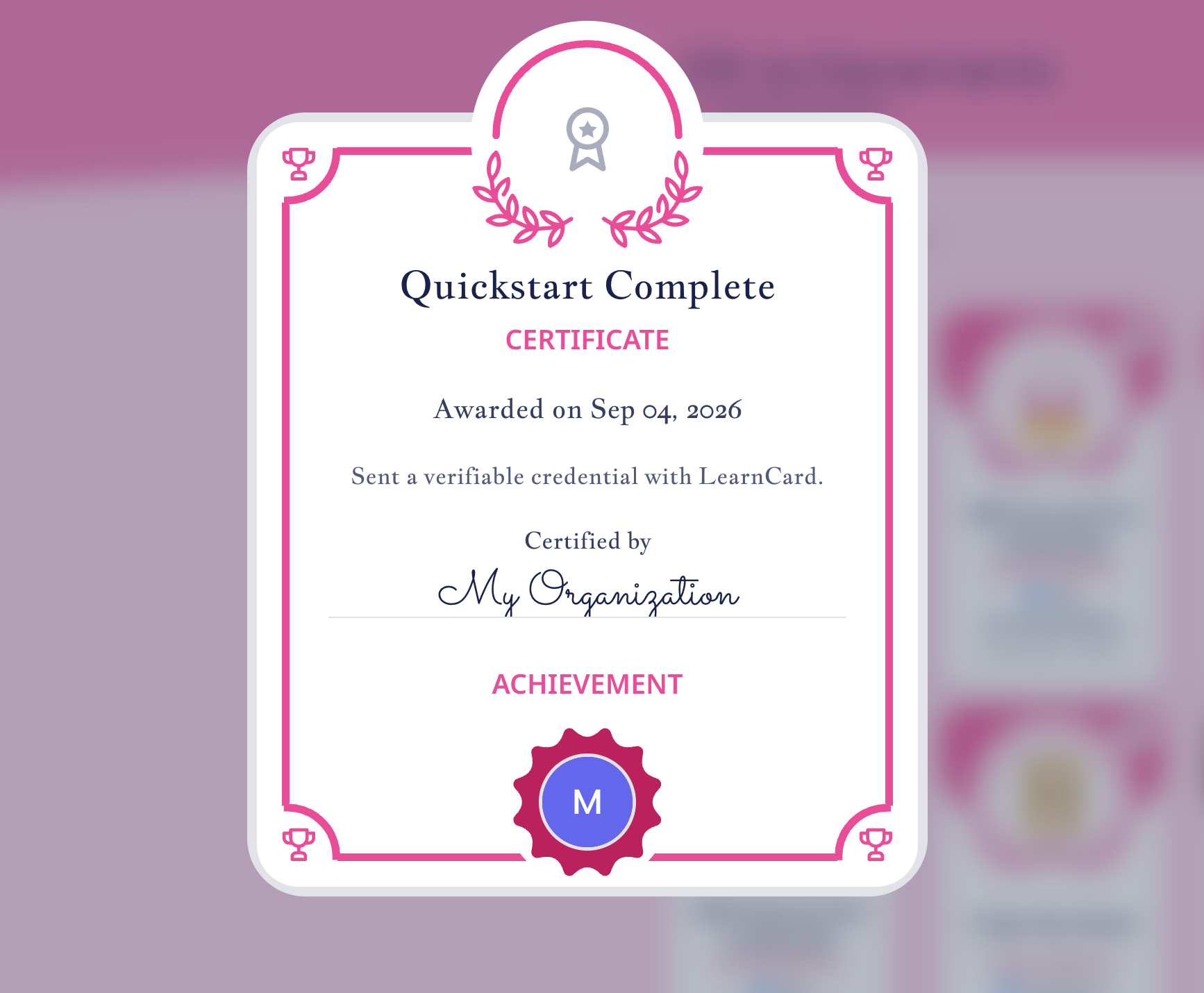
Open the email, tap **Claim**, and sign in or create an account. **"Quickstart Complete"**, a verifiable Open Badges 3.0 credential signed by you, appears in the wallet.
```
Delivered. you@example.com already uses LearnCard — the credential is in their wallet.
```
The recipient already has a verified account, so the credential is in their wallet.
Both are followed by:
```
Reusable template for this badge: lc:network:network.learncard.com/trpc:boost:…
```
You can rerun the script; it creates the profile only once.
{% endtab %}
{% tab title="curl" %}
The response is JSON:
```json
{
"uri": "lc:network:network.learncard.com/trpc:boost:...",
"inbox": { "status": "PENDING", "claimUrl": "https://learncard.app/..." }
}
```
`inbox.status` is `PENDING` for a new recipient — email them `inbox.claimUrl` to claim it — or `ISSUED` if they already use LearnCard, meaning it was auto-delivered with no `claimUrl`.
{% endtab %}
{% endtabs %}
Every `send` saves the badge as a **template** (a Boost). To send the same badge to more people, pass `templateUri: result.uri` instead of `signedCredential`. LearnCard fills in and signs each one server-side once you set up a [signing authority](/build/send-credentials/create-signing-authority.md).
## See it in the app
The seed in your `.env` is a LearnCard account. Open it:
```bash
npx @learncard/cli open
```
That copies your seed to the clipboard and opens the app's developer sign-in page — click **Paste from clipboard** and you're in as the same profile that just sent the badge, with your template in the Developer Portal. `open template`, `open contract`, and `open integration` jump straight to what other commands created.
Your seed is only ever copied, never put in a URL. It also means anyone with your `.env` can sign in as your issuer — keep it out of git.
## If something goes wrong
| You see | Why | Fix |
| --------------------------------------------------------------------------------------------------- | ---------------------------------------------------------------------------------- | ---------------------------------------------------------------------------------------------------------------------- |
| `Cannot use import statement outside a module` | File is named `.js` | Name it `send.mjs` |
| `Key must be a hexadecimal string!` | `SECURE_SEED` isn't 64 hex characters | Generate it with the command in step 1 |
| `A LearnCard has been initialized with a seed that is less than 32 bytes` | Seed is too short | Same — generate a full 64-character seed |
| `Profile already exists!` | Someone else already took your `PROFILE_ID` | Pick a more specific one |
| `Usage: node --env-file=.env send.mjs you@example.com` | No recipient given | Add the email address as the last argument |
| `Sending credentials via phone is a feature reserved for members of the LearnCard Trusted Registry` | You passed a phone number as the recipient | Email works for everyone; phone needs [issuer verification](/build/go-to-production/verify-my-issuer.md) |
| `Failed to send email via Postmark: … marked as inactive` | The address is a placeholder (`example.com`) or has bounced before | Use a real address you can open |
| `You must register a signing authority before using send without a pre-signed credential` | You passed `template` or `templateUri` (server-signed) without a signing authority | Sign locally (`signedCredential`) or [pick who signs](/build/send-credentials/create-signing-authority.md#pick-a-path) |
## Next steps
* [Sign locally, send over HTTP](/build/send-credentials.md#sign-locally-send-over-http) — sign credentials yourself and deliver them from any language via the REST API.
* [The fields that make a credential yours](/understand/verifiable-credentials-vcs/building-verifiable-credentials.md#fields-that-make-a-credential-yours) — add an image, criteria, and skills.
* [Issue at scale with templates](/build/send-credentials.md#issue-at-scale-with-templates) — issue the same badge to many people.
* [Know when a credential is claimed](/build/send-credentials/listen-to-webhooks.md) — get a webhook when it's delivered and when it's claimed.
* [What Do You Want to Build?](/start-here/what-do-you-want-to-build.md) — choose an integration path.
---
# Agent Instructions
This documentation is published with GitBook. GitBook is the documentation platform designed so that both humans and AI agents can read, navigate, and reason over technical content effectively. Learn more at gitbook.com.
## Querying This Documentation
If you need additional information that is not directly available in this page, you can query the documentation by asking a question.
Perform an HTTP GET request on the following URL with the `ask` and `goal` query parameters:
```
GET https://docs.learncard.com/start-here/your-first-integration.md?ask=&goal=
```
`ask` is the immediate question: it should be specific, self-contained, and written in natural language.
`goal` is what the user is ultimately trying to achieve, the reason they need the answer. Sharing it helps GitBook give you a better, more relevant answer. A goal is most helpful when it describes the outcome the user wants rather than restating the question. For example, with `ask=how do I create an API token`, a goal like `automate deployments from our CI pipeline` lets GitBook tailor the answer to that use case.
The response will contain a direct answer to the question and relevant excerpts and sources from the documentation.
Use this mechanism when the answer is not explicitly present in the current page, you need clarification or additional context, or you want to retrieve related documentation sections.